7 Expert Planner Ideas to Help You Be More Productive
Your productivity is not solely dependent on what happens during office work hours
When you feel your best, you do your best. Using a planner for work can help you manage feelings of stress, feel better and carve out more time for creative activities.
Additionally, personal planners are fantastic tools for coping with distractions that can slow down your productivity. It can even be a record of your achievements, for example, keeping track of projects and goals in your planner is excellent data for your year-end review.
Get started on using your planner to increase focus and be more productive with these 7 expert tips.
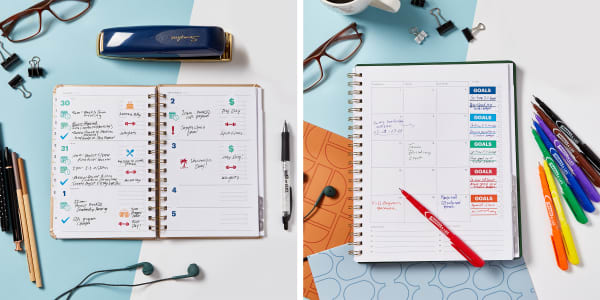
Planner stickers can be fantastic time-management tools. Use them to quickly and neatly add recurring events to your planner and highlight important goals. You can even design your own custom stickers tailored to your activities.
1) Use planner stickers and labels for recurring events
Recurring event planner stickers make it easier to fill in your planner in advance. You can fill in birthdays, annual events, vacations and the days your office observes for holidays as soon as you bring your planner home. Seeing events on the horizon will help you commit to your planner so it’s more effective.
Writing down events in your planner ahead of time can also give you a better sense of control. “Controlling what you can” is one strategy the American Psychological Association (APA) recommends for dealing with stressful times.
Recurring planner stickers for meal-prep, exercising, and relaxing activities can help you create a healthier work-life balance. Having the stickers on hand is a reminder to schedule the self-care time you need so that you can bring your best self to work.
2) Keep your eyes on the prize: highlight SMART goals
SMART is a framework for setting goals and helps you apply time and resources more effectively towards progress. Keeping SMART goals at the forefront of your mind can keep you motivated to stay on track towards more long-term goals and plans. SMART stands for:
- Specific – a narrow goal makes the steps to success more clear
- Measurable – how you will know you’re making progress toward your goal
- Attainable – set goals you can reasonably accomplish to keep you motivated and focused
- Relevant – each goal should align with your larger plan and long-term goals
- Time-based – an end date will help you prioritize and keep you motivated
One way to make your SMART goals stand out in your planner is with planner stickers for goals. You can buy them pre-made or create them yourself to be exactly what you need. Fill them in with permanent markers and place in your planner as needed.
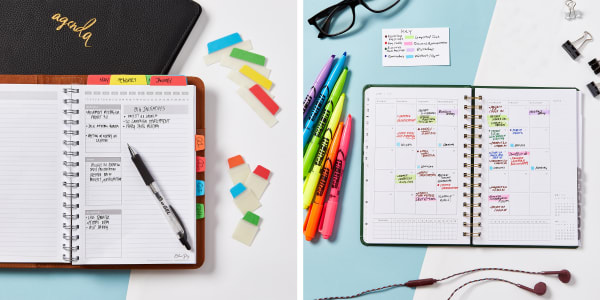
Make the information in your planner easy to scan with index tabs, permanent markers or highlighters for color coding. Strong visual cues help you access information quickly and easy.
3) Organize information in your planner so it’s easy to find
Most planners come with built in tabbed dividers for navigating from month to month. Further dividing the year into quarters, marking your notes section and flagging important details for quick access can make your planner more effective for work.
Repositionable index tabs are awesome tools for organizing sections in your planner or bullet journal. Use wider index tabs for indexing months and notes sections. Quickly flag important dates and information with mini tabs, for example quarter close reporting, fiscal year end and critical meetings or deadlines.
4) Color code like an expert, make it nuanced and make it specific
One way to color code is by priority, so you can manage your time wisely. You may also consider color coding by department/employee if you’re managing multiple teams. Quickly scanning your weekly schedule for a team color makes meeting prep easier.
Another way to color code is by the amount of time a task will take. Being able to quickly scan your planner for 5-10 minute tasks can help you utilize those odd 10-15 minute gaps before going home or between meetings instead of letting them become “lost time.”
No matter what method you use for color coding your planner, make sure to use a color key for quickly referencing your system. Keep your color key handy by putting it on a blank business card that you can use as a bookmark for the current date, or a removable blank label that you can move to the current month or week.
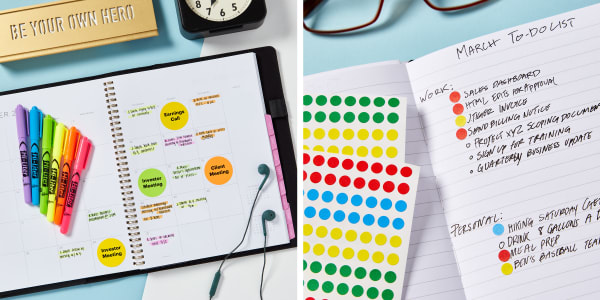
Don’t be afraid to splurge on extras when it comes to planner supplies because if you routinely use your planner it can provide a wealth of data to help you improve. Try adding a pop of color or using removable labels to prioritize lists.
5) Set yourself up for success with good planner habits
Think about how it looks. Aesthetics might not seem important, but don’t underestimate the power of subliminal motivation. If you like looking at your planner you’ll want to use it. Additionally, a neat good-looking planner makes a great impression so you won’t need to leave it behind for important meetings.
Get used to carrying your planner around. Having your planner with you at all times gives you the advantage of information at your fingertips. Pick a size that’s easy for you to carry around and make sure your planner lays flat so it’s easy to write in and reference.
Set aside time to plan daily. You’ll get the most out of your planner if you use it daily. In the morning is the perfect time to recap what needs to be done and what’s on the day’s agenda. Set yourself an alarm to help you remember and use a timer to make sure you spend enough time preparing for the day.
6) Prioritize, review and learn from your to-do lists
The human brain loves ordered tasks, in fact, writing down “to-dos” helps declutter short-term memory, freeing up more mental energy so you can focus in the moment. Further prioritizing and reviewing your planner to-do lists can help you get a better sense of what can realistically be accomplished in one day.
Without realistic expectations it’s easy to fall into the trap of working extended hours trying to “do it all” (especially if you work from home). Healthier work-life boundaries will help you have more time to do creative projects and take care of yourself, which in turn will help you be more productive at work.
7) Mine your planner for mid-year and end of year review data
Quantitative data on all you’ve accomplished is right there in your planner via your accomplished goals, finished projects and to-dos marked done. Mining the data from your planner gives you the tools to advocate for yourself in reviews as well as help fight “imposter syndrome” feelings.
Mid-year is a great time to do a status check on where you are in accomplishing your goals and how to better use your planner. End of year is the time to compile all of your accomplishments and take the list with you to your yearly review. Impressing the boss with how prepared you are is a bonus.
Think holistically about how to help yourself be more productive
Remember that your well-being as a whole person helps you be more productive at work. You are not a machine and you are more than just a body in an office from nine to five. How you think and feel matters and can absolutely affect your work.
Try being more productive and thankful with a gratitude journal. Using a gratitude journal for 30 day challenge is an excellent way to center your focus, and create a positive mindset that will benefit you in the workplace.
How to recreate the printable planner ideas in this article
Click any template link below to open the template in Avery Design and Print Online (ADPO) where it is already formatted for the product listed. All you need to do is customize and print out the labels on your desktop printer, or let us print for you.
When you’re ready to create planner stickers entirely from scratch try our in-depth guide to designing and printing planner stickers on your own.
Recurring event planner stickers:
Icons template / numbers template
White 3/4" round labels (by the package 4221 / by the sheet 94504)
Icons template / numbers template
Clear 3/4" round labels (by the package 4222 / by the sheet 94504)
Icons template / numbers template
Kraft brown 3/4" round labels (by the package 4220 / by the sheet 94504)
Goals planner sticker template
White 1-1/2" x 1-1/2" square labels (by the package 22805 / by the sheet 94106)
Appointment labels template
Astrobrights® 1-2/3" diameter round labels (assorted colors by the package 4330 / individual colors by the sheet 94508)
Additional featured planner supplies:
Permanent Markers, Assorted 8 Pack (9231)
Hi-Liter® Assorted 6 Pack, Pen-Style (23585)
UltraTabs® Assorted Primary Colors (74768)
Mini UltraTabs® Assorted Primary Colors (74763)
Blank Business Cards, 2" x 3-1/2" (5371)
Blank Removable Labels (16460)
1/4" Removable Color-Coding Dots (5795)